How To Get the NFL Rosters For Each Team
8/21/2026 by Alan

Getting NFL Roster Data with R and nflverse
The first part of my roster update process starts outside of MyFootballToolbox. I use R to download the current NFL roster data from the nflverse project.
R is a programming language designed for working with data. It is especially popular for statistics, data analysis, and research, but it is also very useful for something like MyFootballToolbox because it can download, organize, filter, and export large datasets with only a few lines of code.
I do not use R to build the website itself. Instead, I use it as a data collection tool. Its job in this process is to retrieve the NFL roster information and save it into a file that my own MyFootballToolbox utilities can work with.
What Is nflverse?
nflverse is a collection of open NFL data projects and tools built around making football data easier to access and analyze. It includes information such as rosters, player identifiers, schedules, play-by-play data, statistics, draft information, and other NFL datasets.
For roster information, I use the R package nflreadr. This package provides functions that handle the complicated part of locating and downloading the NFL data. Instead of manually going to multiple websites and copying player information, I can request an entire season of roster data directly from R.
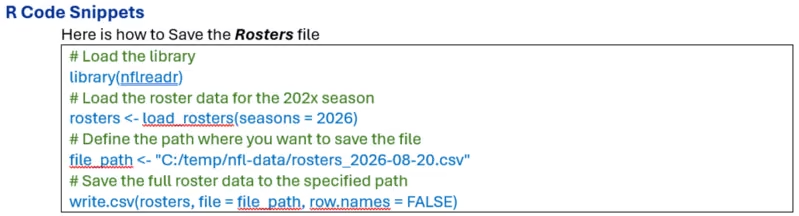
For example, the following command downloads the roster information for the 2026 NFL season:
library(nflreadr)

rosters <- load_rosters(seasons = 2026)
The first line loads the nflreadr library. The second line calls load_rosters() and asks for the 2026 season. The resulting data is placed into an R object named rosters.
At that point I have one large dataset containing players from across the NFL rather than separate files for the Chargers, Chiefs, Cowboys, Packers, and every other team.
Saving the Roster Data
Once the data has been downloaded, I save it as a CSV file.
file_path <- "C:/temp/nfl-data/rosters_2026-08-20.csv"

write.csv(rosters, file = file_path, row.names = FALSE)
A CSV file is simply a structured text file where each row represents a record and the values are separated into columns. Excel can open CSV files directly, which makes it very easy for me to inspect the downloaded data before importing it into MyFootballToolbox.
I normally put the date in the filename, such as rosters_2026-08-20.csv. NFL rosters change constantly, especially during training camp and the beginning of the season. Keeping dated downloads gives me a historical snapshot of what the source data contained at a particular time.
What Comes in the Roster Data?
The downloaded roster file contains much more information than just a player's name and team. Depending on the available source data, it can include fields such as:
- Player name
- First and last name
- Team abbreviation
- Position
- Date of birth
- Height and weight
- College
- NFL experience
- Jersey number
- Roster status
- GSIS player ID
- Other player identification fields
This raw dataset becomes the starting point for the MyFootballToolbox roster system.
The important distinction is that nflverse provides the source data, while MyFootballToolbox decides how that data should be organized, stored, and displayed. I keep those two jobs separate. R gets the data. My own software controls what happens to it afterward.
R Code to Save the Current Rosters File
Importing the CSV into the MyFootballToolbox SQLite Database
After downloading and reviewing the roster CSV file, I move into the part of the process that I control completely: importing the data into MyFootballToolbox.
I built a set of VB.NET utilities specifically for maintaining the website's NFL data. Rather than having the website read the nflverse CSV file directly, the VB.NET program acts as the middle layer between the original source data and the databases used by MyFootballToolbox.
The roster databases are maintained in:
D:\Dropbox\_Personal\Websites\myfootballtoolbox.com\nfl\rostersWhy Import the Data Instead of Using the CSV Directly?
I could theoretically have the website read the downloaded CSV file, but that would make the website dependent on the structure of an outside data source.
Instead, I import the information into my own SQLite database format. This gives me control over field names, player identifiers, historical seasons, team abbreviations, database relationships, and the exact information the website needs.
It also means that if nflverse changes one of its columns in the future, I only need to adjust my import program. I do not necessarily have to rewrite all of the PHP pages that use the roster database.
The VB.NET Import Process
The MyFootballToolbox utility reads each row from the CSV file and processes the player information before it is inserted into SQLite.
Conceptually, the import process looks like this:
- Open the roster CSV file.
- Read the column headings.
- Read each player record.
- Determine the player's team, position, status, and identifying information.
- Convert source values into the format expected by MyFootballToolbox.
- Insert or update the player in the appropriate roster database.
- Repeat the process until all roster records have been processed.
This is where I can also normalize information that may be represented differently by the source data.
For example, team abbreviations are important because the abbreviation stored in the database must match the abbreviation MyFootballToolbox expects when building team pages. The same concept applies to positions, player IDs, dates, and roster status values.
The SQLite Roster Database
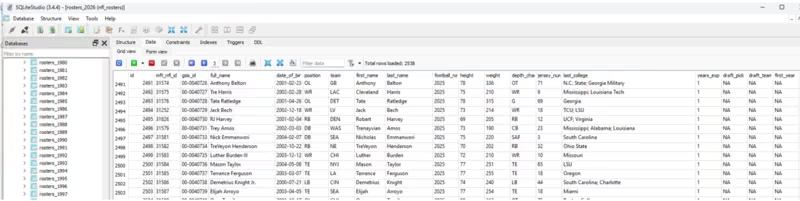
I use SQLite because it works extremely well for this type of website. An SQLite database is contained in a normal file, does not require a separate database server, and can be accessed easily by both my VB.NET desktop programs and the PHP code running the website.
Each player becomes a database record with fields such as:
- Internal MyFootballToolbox player ID
- NFL or GSIS ID
- Full name
- First name
- Last name
- Date of birth
- Position
- Team
- Jersey number
- Height
- Weight
- College
- NFL experience
- First NFL season
The database can contain thousands of records for a season because the source data is not limited to the final 53 players on each team. It can also contain players who were in training camp, on reserve lists, on practice squads, or otherwise associated with NFL rosters during the season.
Keeping Historical Rosters
One of the major benefits of storing the information this way is that I do not have to throw away the previous season every time a new season begins.
MyFootballToolbox maintains roster information by year, allowing the website to show historical team rosters going back many seasons.
That turns what could have been a temporary roster page into a long-term football database.
The basic data flow at this point is:
nflverse → R → CSV → MyFootballToolbox VB.NET Importer → SQLite
Once the SQLite database has been created and populated, the data is ready for the website.
Roster Database Used in MyFootballToolbox.com
Turning the Roster Database into Team Pages on MyFootballToolbox.com
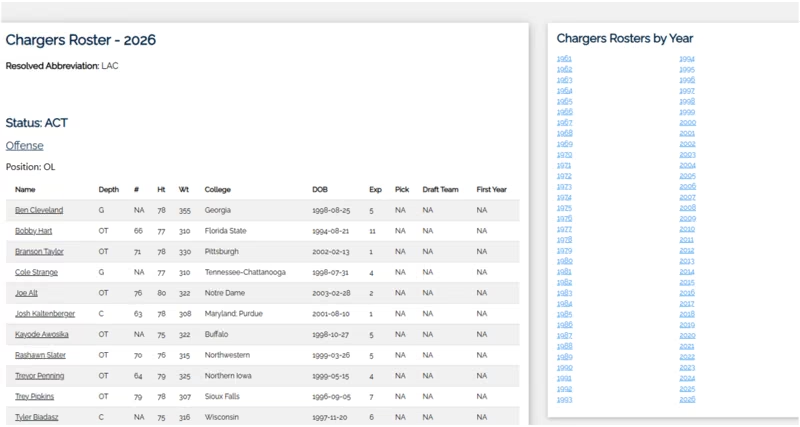
The final part of the process is where all of the downloaded and imported data becomes something useful to a visitor: the individual NFL team roster pages on MyFootballToolbox.com.
The website does not need to know anything about R or the original CSV file. By the time the roster information reaches the website, all of that work has already been completed.
The PHP code simply reads the MyFootballToolbox SQLite database and asks for the records needed for the page being displayed.
One Database Can Power All 32 Teams
The roster data contains a team abbreviation for each player. This makes it possible to use the same underlying database to generate roster pages for every NFL team.
If a visitor opens the Chargers roster page, the website retrieves the records associated with the Chargers abbreviation. If the visitor opens the Packers page, the same code retrieves the Packers players instead.
This means I do not have to maintain 32 completely independent roster systems.
The same PHP roster code can be reused for:
- Los Angeles Chargers
- Kansas City Chiefs
- Denver Broncos
- Las Vegas Raiders
- and all of the other NFL teams
The team changes, but the underlying system remains the same.
Organizing Players on the Page
Once the correct team's records have been retrieved, the website can organize them into useful groups.
For example, the Chargers roster page can first separate players by roster status and then organize them by position.
An offensive line section might contain:
- Player name
- Depth or roster designation
- Jersey number
- Height
- Weight
- College
- Date of birth
- NFL experience
- Draft information
- First NFL season
The player name can also become a link into other parts of MyFootballToolbox, allowing the roster database to connect with individual player pages and other NFL information.
Using the Same System for Different Seasons
The year is another important part of the roster system.
When someone views the 2026 Chargers roster, MyFootballToolbox uses the 2026 roster information. If the visitor selects 2025, 2024, or an older season, the site can load the appropriate historical data instead.
This allows each team page to include a list of roster years and gives the site a historical structure instead of showing only the current team.
For me, this is one of the most useful parts of the system. Every year that I continue importing roster data makes the website's historical database a little more complete.
Separating the Data from the Presentation
The key design decision throughout the entire process is keeping the data separate from the page that displays it.
The SQLite database contains the football information. The PHP code determines how that information should appear.
Because those two responsibilities are separate, I can redesign the roster page without rebuilding the roster database. I can also add new fields to the database without having to manually edit hundreds of team pages.
The same underlying player information can eventually be used in many different parts of MyFootballToolbox, including:
- Team rosters
- Historical rosters
- Player profile pages
- Depth charts
- Draft information
- Fantasy football tools
- Player statistics
- Team history pages
The Complete Process
The entire roster system can be summarized as:
nflverse → R/nflreadr → CSV → MyFootballToolbox VB.NET utilities → SQLite database → PHP → Team roster pages
Each part of the system has one main responsibility. nflverse provides the football data. R downloads it. My VB.NET utilities transform and store it. SQLite keeps it organized. PHP turns it into the pages visitors see on MyFootballToolbox.com.
That is what allows me to maintain rosters for all 32 NFL teams without manually building and updating thousands of individual player entries every season.
Displaying the Rosters on myfootballtoolbox-com